

01 / Webinar on Demand
Missed the webinar?
Watch the recording now.
Thank you for your interest in PROFINET and for your questions. Use the recording to explore topics such as network load, network performance, and segmentation at your own pace.
Follow-up-Webinar from November 11, 2026: “TCP/IP & PROFINET – Your Questions, Our Answers.”
02 / Practical Example
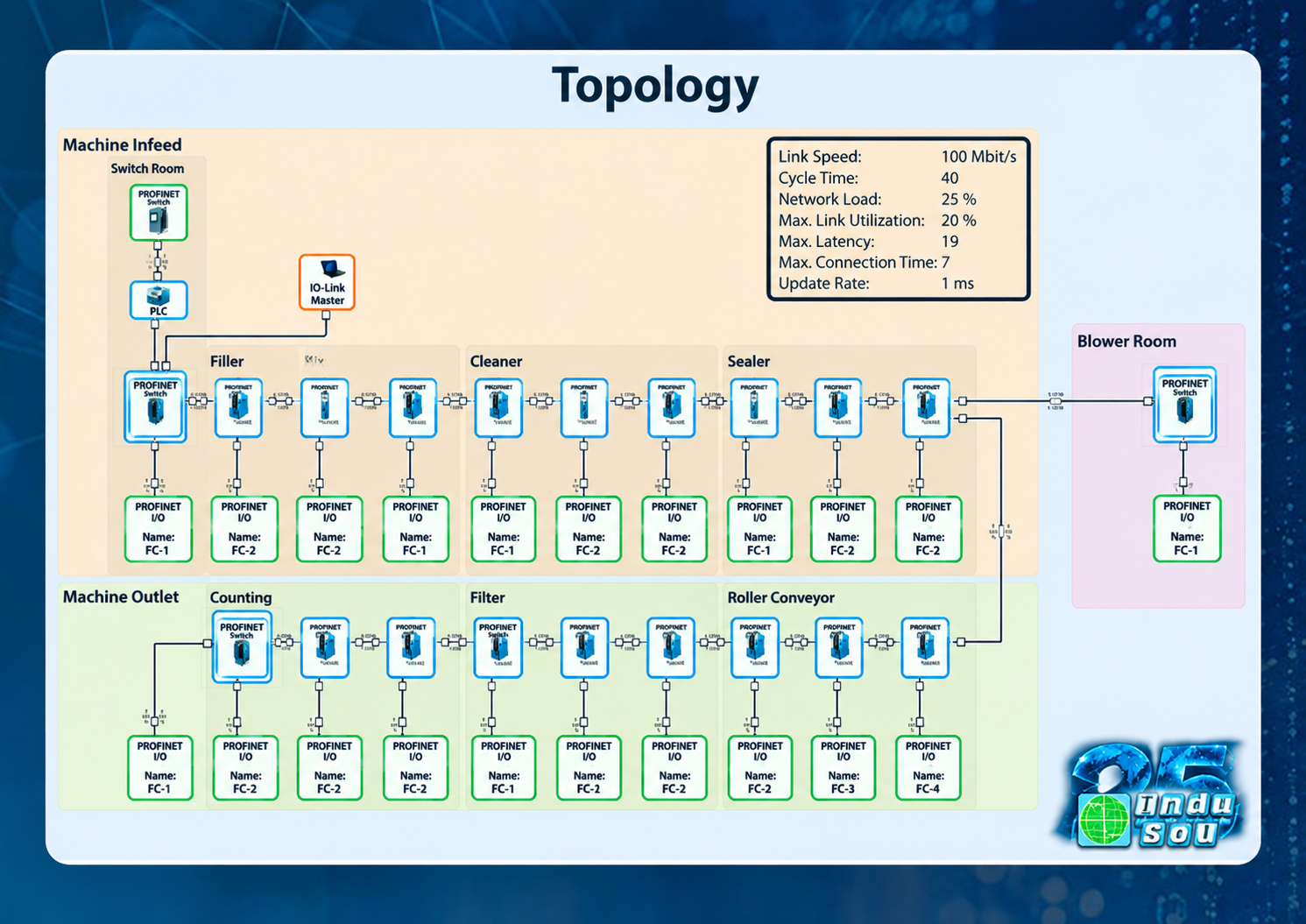
Network Load in Real System Setup.
Explore the network topology from the webinar handout. The setup illustrates PROFINET communication throughout the system, the different network segments, and additional TCP/IP access.
03 / Topics
Webinar Questions & Answers
Here are some of the questions submitted. We answer them during the webinar. If you have any individual questions, feel free to contact us.
Can PROFINET and TCP/IP operate on the same network?
Yes. PROFINET and TCP/IP can communicate over the same network infrastructure. Modern Industrial Ethernet switches prioritize PROFINET telegrams, ensuring that real-time communication takes priority over regular TCP/IP data traffic.
Why were PROFINET and other network communications often kept separate in the past?
Past experiences with network failures and limited switch technology led many machine builders to use separate networks. However, modern switch technology offers much better performance and traffic prioritization.
What is the purpose of prioritization in a PROFINET switch?
Prioritization ensures that important PROFINET telegrams are transmitted first. TCP/IP data is given lower priority, helping to keep PROFINET communication stable.
What does a network load of 20 percent mean?
The 20% figure is a recommendation for certain access-layer switches, not a general limit for every network. The actual network capacity depends on factors such as switch technology, network topology, and communication between devices.
What is the difference between access-layer and distribution-layer switches?
- Access-Layer Switch: All ports are generally equal. During the webinar, a maximum network load of around 20% was recommended for these switches.
- Distribution-Layer Switch: Has additional high-performance uplink or backbone ports. Depending on the device, higher network loads of around 40–60% may be possible.
What impact does a remote desktop connection have on PROFINET communication?
In the test, the remote desktop connection generated approximately 2% additional network load. PROFINET communication remained stable, but increased jitter was observed.
What happens during a large file transfer over a PROFINET network?
During the file transfer, a 3.2 GB file was transferred between two laptops. This temporarily generated high additional network loads of around 40–52%. Despite this, PROFINET communication remained stable, and no device failures were detected.
What does jitter mean in PROFINET?
Jitter describes variations in the timing of PROFINET telegram transmission. Higher jitter means that telegrams may arrive later than expected. During the webinar, a maximum jitter of 50% was recommended.
Does additional TCP/IP communication automatically lead to PROFINET failures?
No. The tests showed that additional TCP/IP communication does not automatically cause PROFINET failures. Switches can prioritize network traffic accordingly. However, additional data traffic can still affect jitter.
How much network load does an AR headset generate?
In the test, the AR headset generated approximately 5% additional network load. This allowed video and audio to be transmitted over the existing network infrastructure.
Why is a shared network infrastructure beneficial for AR applications?
A shared infrastructure can eliminate the need for additional network cables and separate Wi-Fi networks. This helps reduce costs and makes it easier to integrate new applications such as remote support and remote maintenance.
Can AR glasses also operate over an existing PROFINET network in the control room?
Yes. The webinar demonstrated how AR glasses can be connected to a remote area via a wired PROFINET network connection. This allows an on-site service technician to receive remote support.
What are the benefits of remote support using AR glasses?
The service technician can receive support directly on-site. An expert can see the situation through the glasses‘ camera and provide guidance for troubleshooting. This makes communication easier and can help avoid unnecessary service visits.
What role does network security play in remote support?
VPN connections and firewalls can be used to ensure secure remote access. The webinar presented a concept in which the VPN tunnel extends into the machine network. This allows machine builders to securely access their machine communication.
What are the benefits of a shared network infrastructure for machine builders?
- Fewer separate network cables
- Reduced installation and material costs
- Better use of existing network infrastructure
- Easier integration of additional TCP/IP applications
- New opportunities for remote support and AR applications
Request the Webinar

Your Personal Contact
Luise Wolf
Webinar Management
Tel: +49 (0) 34491 580-228
E-Mail: webinar@indu-sol.com
Do you have any questions you would like answered during the webinar? Feel free to send them to us by email.